
Lesson 6: Automated Playback
Goals for This Lesson
Learn how to create automated music playback using text data and GUI tools.
Specifically, this lesson covers:
- Automated output using text data
- Automated audio file playback driven by text sequences
- Beat programming with a GUI (rhythm machine)
- Overview of DAW integration via MIDI
Automated Output with Text Data
In Pd, you can use text data to output messages at specified timings in sequence. This makes it possible to play sounds automatically based on pre-written data.
Objects Used
| Object | Function |
|---|---|
text define | Define and store text data |
text sequence | Output text data line by line in order |
Text Data Format
Each line is a pair of a destination (where to send) and the text to send, ending with a semicolon (;). If you put a number (milliseconds) at the start of a line, the sequence advances to the next line automatically after that much time has elapsed (auto mode).
note c;
500 note d;
500 note e;
500 note f;
500 note e;
500 note d;
500 note c;
1000 note e;
In the example above (the opening of "Frog Song"), note is the destination and c, d, e... are the values to send. The first line has no number, so c is sent immediately; from the second line on, each note is sent after waiting 500 (milliseconds) from the previous one. The sent value is received with [r note].
Writing Text Data
- Each line is written as
destination value;, ordelay destination value; - Destination: the name to send to. It arrives at
[r destination]in Pd (e.g.,note→[r note]) - Delay (optional): a number at the start of the line. In
automode, it waits this many milliseconds from the previous line before sending (omit it to send immediately; the first line omits it) - Value: what to send to the destination (a note name, file name, etc.)
- Every line must end with a semicolon (
;) - To enable destinations, add the
-gflag totext sequence(e.g.,[text sequence kaeru -g])
Full "Frog Song" data
note c;
500 note d;
500 note e;
500 note f;
500 note e;
500 note d;
500 note c;
1000 note e;
500 note f;
500 note g;
500 note a;
500 note g;
500 note f;
500 note e;
1000 note c;
1000 note c;
1000 note c;
1000 note c;
1000 note c;
250 note c;
250 note d;
250 note d;
250 note e;
250 note e;
250 note f;
250 note f;
250 note e;
500 note d;
500 note c;
Patch Example
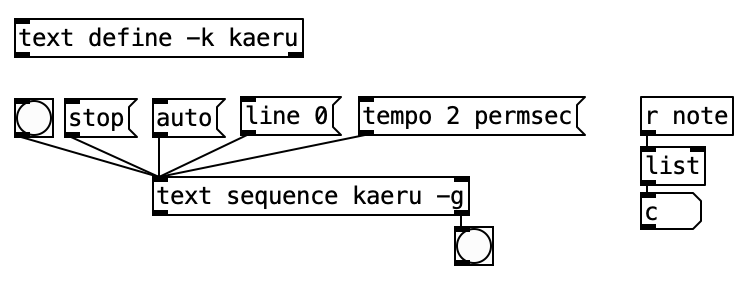
Write the text data inside text define -k kaeru, and text sequence kaeru -g sends it line by line. The -g flag makes the leading symbol of each line (note) a destination, so the note can be received with [r note].
Automated Audio File Playback via Text
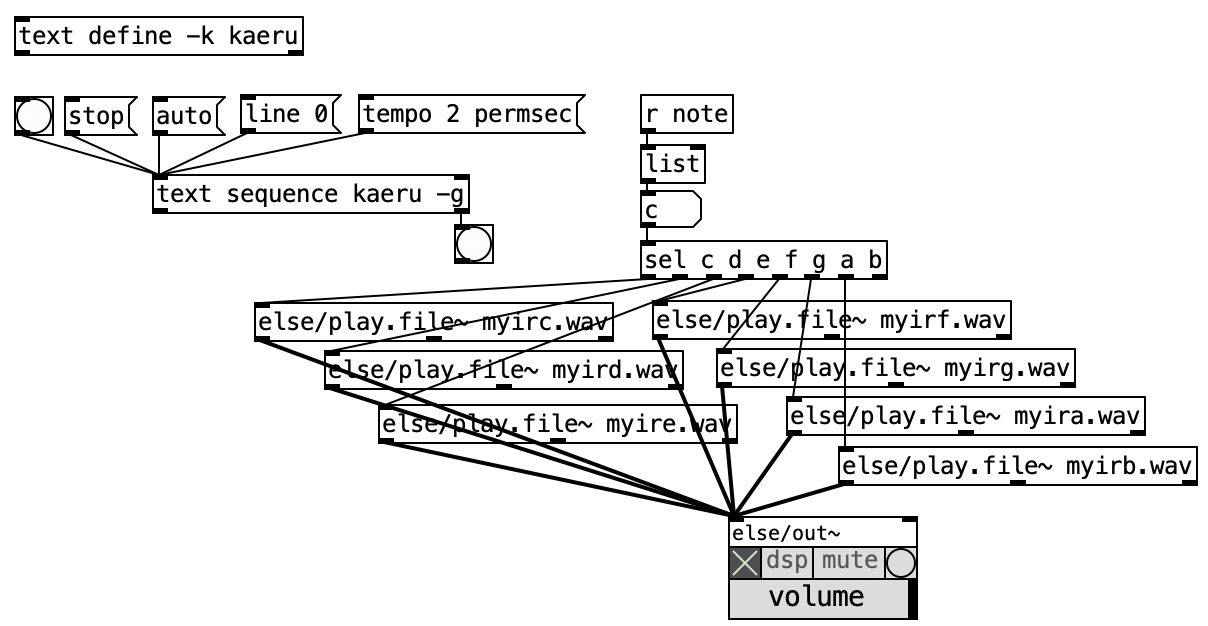
By connecting the output of text sequence to else/play.file~, you can automatically play audio files in the order specified by the text data.
Key Messages
| Message | Action |
|---|---|
auto | Enable auto-play mode (automatically outputs the next line based on timing in the text data) |
bang | Output the next line manually (manual mode) |
line 0 | Return to the beginning |
Steps
- Write text data (in the form
destination value;— file names, note data, etc.) insidetext define - Create a
text sequencewith thetext definename and the-gflag (e.g.,[text sequence kaeru -g]); receive each destination with[r destination] - Send
autoto output each line automatically in order, following the leading number (milliseconds) - Send
bangto output one line at a time manually (the delay numbers are ignored) - Send
line 0to return to the first line
Choosing Between auto and bang
auto: Advances automatically at time intervals specified in the text data. Best for BGM and automated playback.bang: Advances one step at a time with user interaction (e.g., pressing a button). Best for interactive performance.
Patch Example
Beat Programming with a GUI
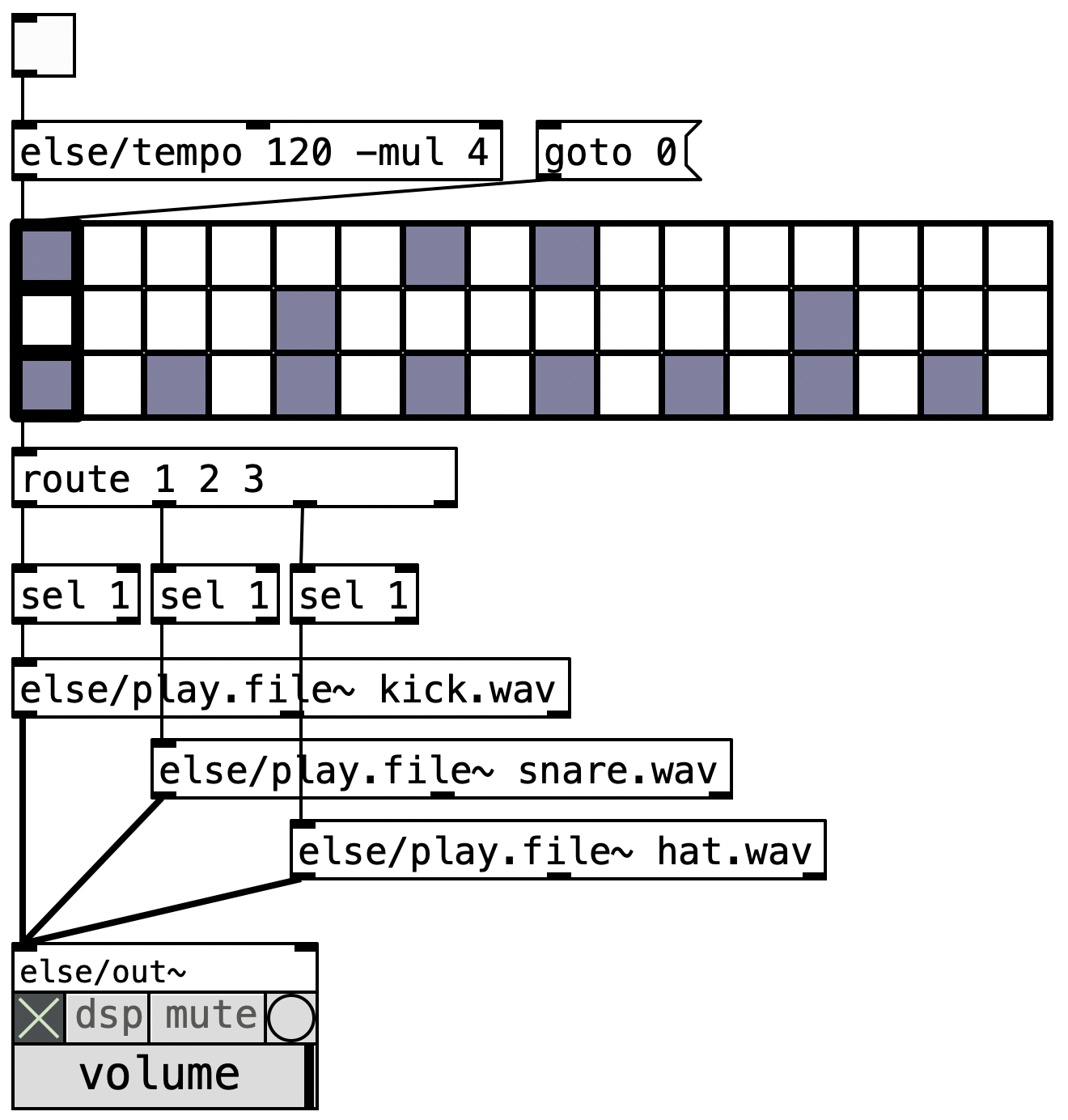
The else/drum.seq object provides a graphical interface for programming rhythm patterns. You can click with the mouse to intuitively build beats.
Objects Used
| Object | Function |
|---|---|
else/drum.seq | Rhythm pattern GUI editor |
else/tempo | Set the tempo (BPM) |
route | Route output data to different instruments |
Setting the BPM
Use the else/tempo object to set the BPM (Beats Per Minute).
- Specify the BPM value as an argument (e.g.,
else/tempo 120) - You can also change the BPM dynamically by sending a number message
BPM Reference
| BPM | Feel |
|---|---|
| 60--80 | Slow (ballad) |
| 100--120 | Medium (pop) |
| 120--140 | Somewhat fast (dance music) |
| 140--180 | Fast (drum and bass) |
Building a Rhythm Machine
- Create an
else/drum.seqand program rhythm patterns in the GUI - Set the BPM with
else/tempo - Use
routeto distribute each track's output (kick, snare, hi-hat, etc.) - Connect audio sources (
else/play.file~or synthesizers) to each track
Patch Example
Automated Playback via MIDI with a DAW
Reference Information
Pd can also connect to DAW (Digital Audio Workstation) software using MIDI (Musical Instrument Digital Interface).
Overview
MIDI is a standard protocol for exchanging performance data between electronic instruments and computers. Pd can send MIDI messages to or receive them from external DAWs such as Ableton Live and GarageBand.
Using MIDI in Pd
- MIDI output: Use the
noteoutobject to send MIDI notes - MIDI input: Use the
noteinobject to receive MIDI notes from external sources - Virtual MIDI bus: On macOS, you can create a virtual MIDI bus in "Audio MIDI Setup" to connect Pd and a DAW
Scope in This Course
MIDI integration is an advanced topic. We will only cover the overview in this course, but feel free to consult the instructor if you want to use it in your project.
Practice Exercises
Exercise 1: Play "Frog Song" One Note at a Time with the A Button
Use text define and text sequence to prepare the melody of "Frog Song" (Kaeru no Uta), and create a patch that plays one note each time the micro:bit's A button is pressed.
Hint
- Write the note data in
text definein the formdestination value;(e.g.,note c;500 note d;500 note e;...) - Add the
-gflag totext sequence(e.g.,[text sequence kaeru -g]); receive the note destination with[r note] - Use the
bangmessage ontext sequenceto output one note at a time (with the A button, the leading delay is ignored and it advances one note per press) - Send
bangwhen the A button is pressed - Route the received note data with
seland connect it toosc~or an audio file player - Consider using
line 0to return to the beginning when the song ends
Exercise 2: Rhythm Machine with Tilt-Controlled Tempo
Create a rhythm machine using else/drum.seq, and make the BPM (tempo) change based on the micro:bit's tilt.
Hint
- Create rhythm patterns with
else/drum.seq - Control the BPM with
else/tempo - Get the micro:bit's tilt (accelerometer) value
- Map the tilt value to a BPM range (e.g., 60--180)
- Use the
scaleobject to convert the value range - If the value changes too rapidly, use
else/lowpassto smooth it out